Sudbury Firearms and Hunter Education
Ontario Hunter Education Program Sign Up
Step 1
Click the following link to view the OHEP course calendar
Step 2
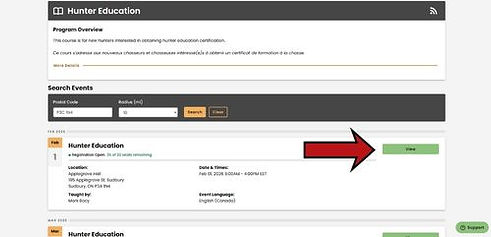
In the postal code box, enter our postal code: P3C 1N4
Then click search

Step 3
Select the course you are attending by clicking the "view" box
Step 4
Click the "register now" box

Step 5
Create an account by clicking the "Sign Up"

Step 6
enter you email (1) and your date of birth (2)
then click search (3)

Step 7
fill your information in the form provided ( you may have to scroll to view all the information required)
ensure you remember the email and password you used. (we recomend writing it on a piece of paper and store it in a safe place)

Step 8
Click submit

Step 9
You will receive an email from
onsupport=ontario.kalkomey.com@storefront.kalkomey.com
Open the email and click "Confirm Email"

Step 10
Sign in using the email and password you provided
1. Email Address
2. Password
3. Click Sign In

Step 11
Fill the required fields (1) and check the box at the bottom (2) and submit (3)

Step 12
Ensure information is accurate then click Finish Registration

Step 13
Youre all set to attend the course. We'll see you in class!
